
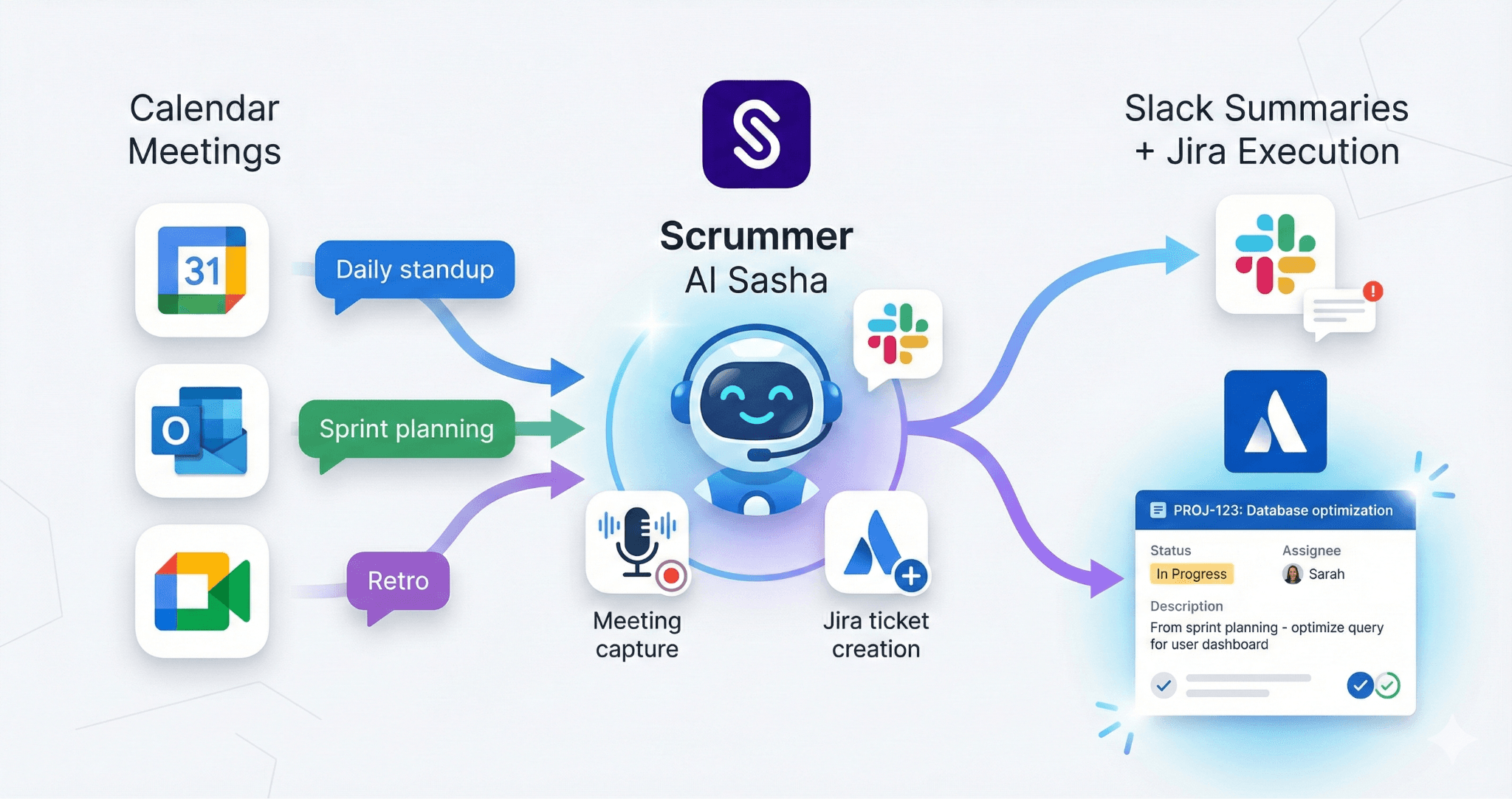
Scrummer AI captures calendar meetings, processes with Sasha AI agent, and delivers outputs to Slack channels and Jira tickets automatically.
TL;DR
- What it is: Conversation intelligence software uses AI to capture, analyze, and activate team discussions from meetings and chat platforms - The category split: While tools like Gong focus on sales calls, engineering teams need purpose-built solutions - What engineering needs: Tools that connect discussions to Jira, automate standup tracking, and turn decisions into tickets automatically - This guide covers: What conversation intelligence is, engineering vs sales differences, 5 core capabilities, real examples, and how to evaluate solutions like Scrummer AI
Who Is This For?
This guide is designed for:
- Engineering managers looking to reduce meeting overhead and improve team execution - Product managers struggling with the gap between discussions and Jira tickets - CTOs and VP of Engineering evaluating conversation intelligence tools for distributed teams - Scrum masters and agile coaches seeking to automate standup summaries and retro documentation - DevOps and platform leads wanting to track blockers and improve team velocity
You'll get the most value if:
- Your team uses Jira (or Linear/GitHub Projects) for work tracking - You collaborate via Slack or Microsoft Teams - You run agile ceremonies (standups, retros, sprint planning) - You have remote or distributed team members across timezones - You've noticed decisions in chat don't consistently make it to Jira
This guide may not be for you if:
- You're looking for sales conversation intelligence (CRM-focused tools like Gong) - Your team doesn't use structured project management tools - You're in a non-technical role evaluating general meeting software
Your engineering team has countless conversations every day. Standups. Slack threads. Planning meetings. Retro discussions. Code review comments.
Decisions get made. Action items get called out. Blockers get raised.
And then... nothing happens. The decision lives in a Slack thread that gets buried. The blocker mentioned in standup never makes it to Jira. The action item from planning gets forgotten by Friday.
Sound familiar?
This is the problem conversation intelligence software solves. The market has exploded from $25.3 billion in 2025 to a projected $55.7 billion by 2035. But here's what most people miss: conversation intelligence for engineering teams is fundamentally different from sales-focused tools.
This guide explains what conversation intelligence is, why engineering teams need a different approach, and what to look for.
What Is Conversation Intelligence Software?
Conversation intelligence software uses AI to capture, understand, and activate conversations across your team's communication channels.
Think of it as a smart assistant that:
- Captures conversations from meetings (via calendar integration) and your chat platform (Slack or Teams) - Transcribes everything with speaker identification (who said what) - Extracts key decisions, action items, and blockers automatically - Understands context across multiple conversations over time - Activates insights by connecting to your work systems (like Jira or project management tools) - Tracks patterns, sentiment, and team health
The key difference from simple recording: Conversation intelligence doesn't just document what happened. It understands what it means and makes it actionable.
For example, Software Engineering Intelligence platforms help teams "make data-driven decisions, optimize processes, and ultimately deliver better software" by analyzing conversations and connecting them to actual work metrics.
How it actually works: Tools like Scrummer AI connect to your calendar (Google Calendar or Outlook), join meetings automatically based on your calendar invites, and deliver outputs to your team's chat platform (Slack or Teams) and Jira.
Why Sales Tools Don't Work for Engineering Teams
Here's the challenge: Most conversation intelligence tools were built for sales teams.
Sales-Focused Conversation Intelligence
Tools like Gong, Chorus.ai, and Jiminny dominate the market. They're designed to:
- Analyze customer calls for objections and competitor mentions - Track revenue signals and buying intent - Coach sales reps on talk-to-listen ratios - Update CRM (customer relationship management) records automatically - Forecast deal outcomes
They're excellent—for sales teams.
What Engineering Teams Actually Need
Engineering and product teams have completely different workflows:
|Sales Teams Need|Engineering Teams Need| |---|---| |Salesforce/CRM integration|Jira or Linear integration| |Call analysis and coaching|Standup, retro, and planning context| |Revenue forecasting|Sprint health and blocker tracking| |Customer sentiment analysis|Team velocity and execution gaps| |One-to-one customer conversations|Team collaboration via Slack or Teams|
Engineering teams don't need objection handling analysis. They need their Slack conversation about a bug to automatically become a Jira ticket with the right owner assigned.
💡 KEY INSIGHT — Sales conversation intelligence focuses on revenue signals from external conversations (with customers). Engineering conversation intelligence focuses on execution signals from internal collaboration (within your team). The tools, integrations, and outputs are completely different.
5 Core Capabilities Engineering Teams Need
Based on research from engineering intelligence implementations and real team needs, here's what to look for:
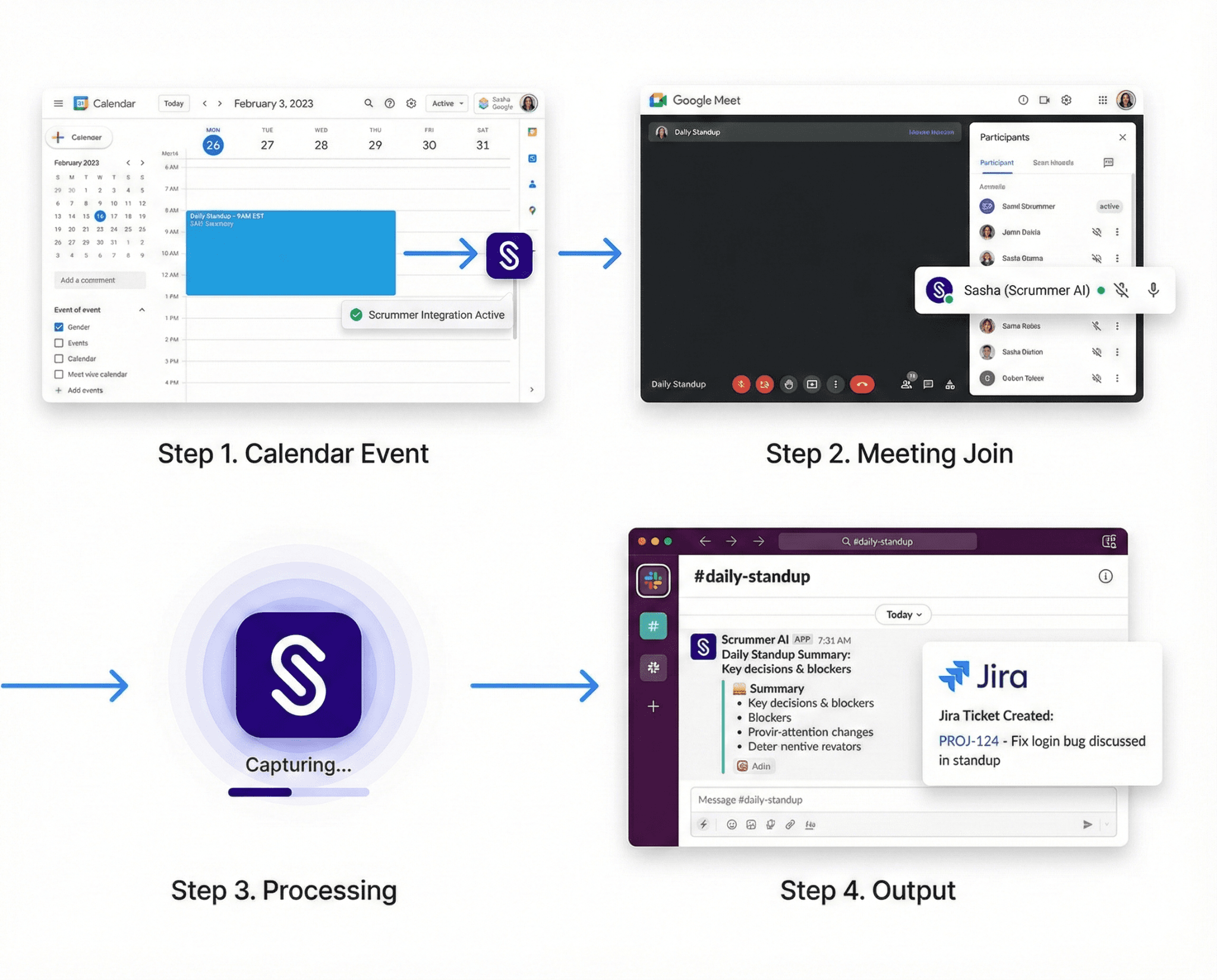
Scrummer connects to your Google or Outlook calendar, automatically joins meetings, and delivers outputs to Slack/Teams and Jira.
1. Understanding Agile Workflows
Engineering teams follow structured workflows called "agile ceremonies." Your conversation intelligence needs to understand:
- Daily standups — Short meetings where team members share progress, blockers, and plans - Sprint retrospectives (retros) — Team reflection meetings at the end of each 2-week work cycle to discuss what went well and what to improve - Sprint planning — Meetings where the team decides what work to tackle in the next sprint and estimates effort (often in "story points") - Code reviews — Technical feedback sessions on proposed changes - Incident post-mortems — After-incident reviews to document what went wrong and how to prevent it
Why this matters: Generic meeting tools treat all meetings the same. Agile-specific tools understand that a standup needs different outputs than a brainstorming session.
Example: Scrummer AI is built around agile workflows. You set meeting types (standup, retro, planning), and it automatically formats outputs appropriately—standup summaries go to Slack channels, retro action items become Jira tickets with assigned owners.
2. Capturing Chat Platform Conversations
Engineering teams don't just talk in meetings. Critical decisions happen in:
- Slack threads about production incidents - Teams channels discussing architecture choices - Direct messages (DMs) resolving blockers between team members - Emoji reactions signaling agreement on proposals
Your conversation intelligence must capture these async (not real-time) conversations from your team's chat platform—whether that's Slack or Microsoft Teams.
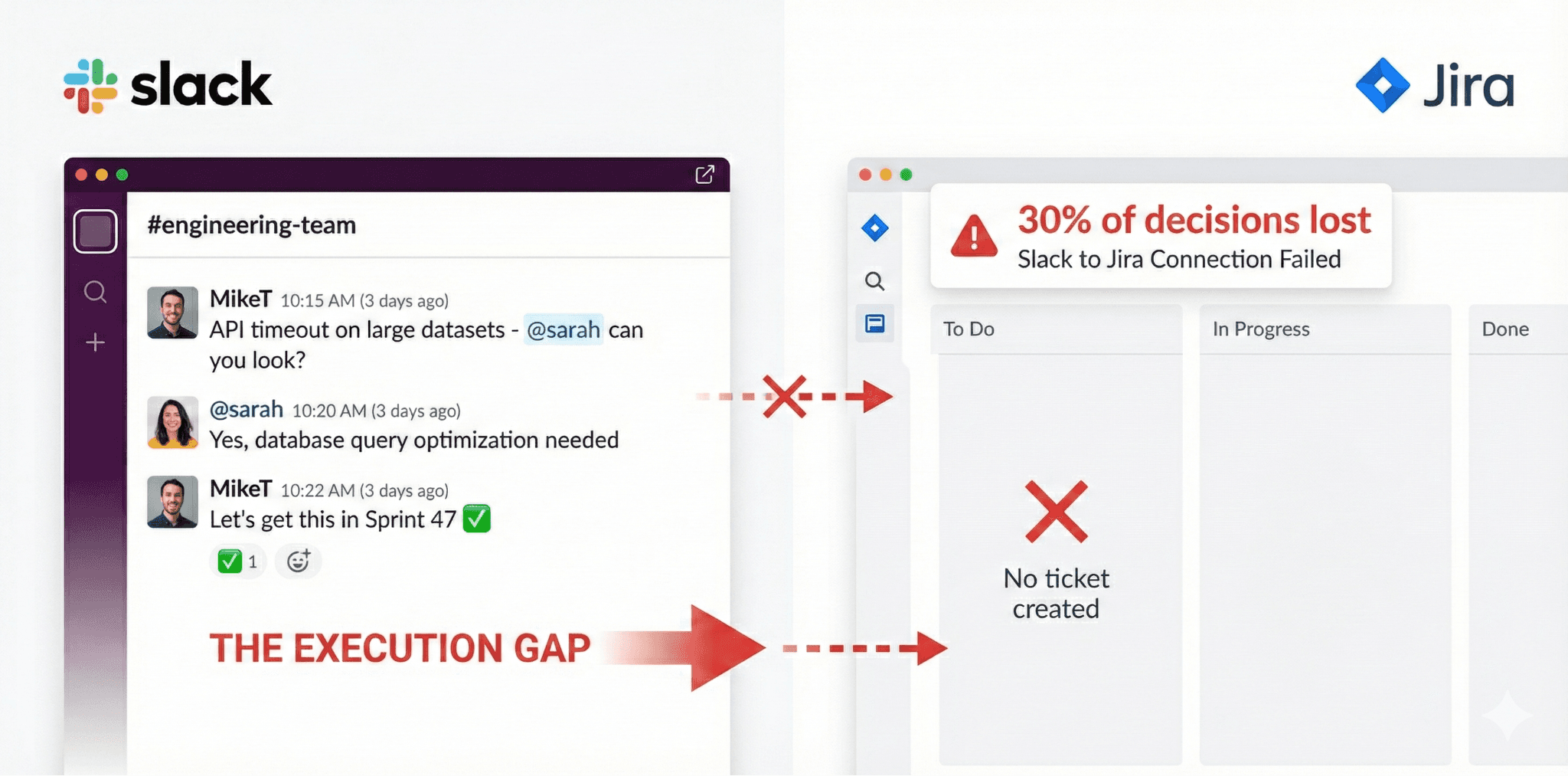
30% of decisions made in Slack never make it to Jira—conversation intelligence like Scrummer automatically bridges this gap.
⚠️ THE SLACK BLACK HOLE PROBLEM — Research shows that 30% of decisions made in Slack never make it to Jira, creating an "execution gap" where conversations don't become action. Conversation intelligence for engineering teams must bridge this gap.
What to look for: Native integration with your chat platform (Slack or Teams) that can monitor channels, capture context, and create work items without manual copying and pasting.
3. Two-Way Jira Integration
This is non-negotiable. Your conversation intelligence must work seamlessly with Jira (or similar project management tools like Linear or GitHub Projects).
It should:
- Create tickets automatically from discussions - Update status based on standup reports ("I finished the login bug") - Add context from conversations to existing issues - Assign owners based on who volunteered in the discussion - Link conversations to related tickets for full context
Two-way connection is crucial: It's not enough for the tool to just create Jira tickets (one-way). It should also pull information FROM Jira to provide context. For example, before a sprint planning meeting, show the current sprint's completion status.
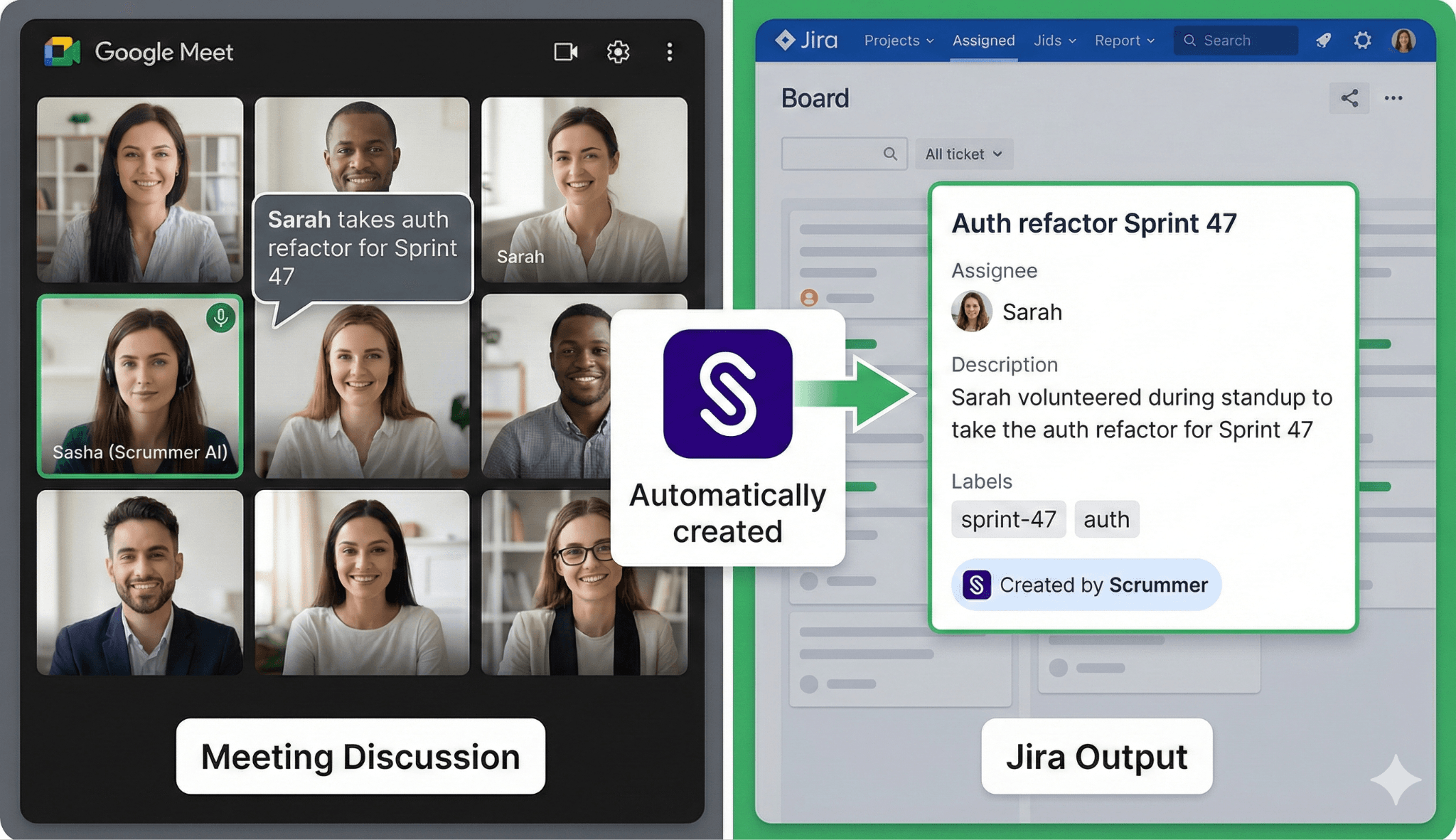
Meetings end with automatic Jira tickets including full context, assignees, and sprint assignment—no manual entry required.
Example: Teams using Jira-Slack automation report that "integrating Jira and Slack can reduce the time spent on administrative tasks by up to 50%".
Scrummer AI offers bidirectional Jira integration—creating tickets from conversations and pulling Jira data for sprint digests and project updates.
4. Supporting Remote and Distributed Teams
Engineering teams are increasingly distributed across timezones. Your conversation intelligence should support:
- Daily check-ins — Prompt team members at their local time about progress and blockers (no synchronous meeting needed)
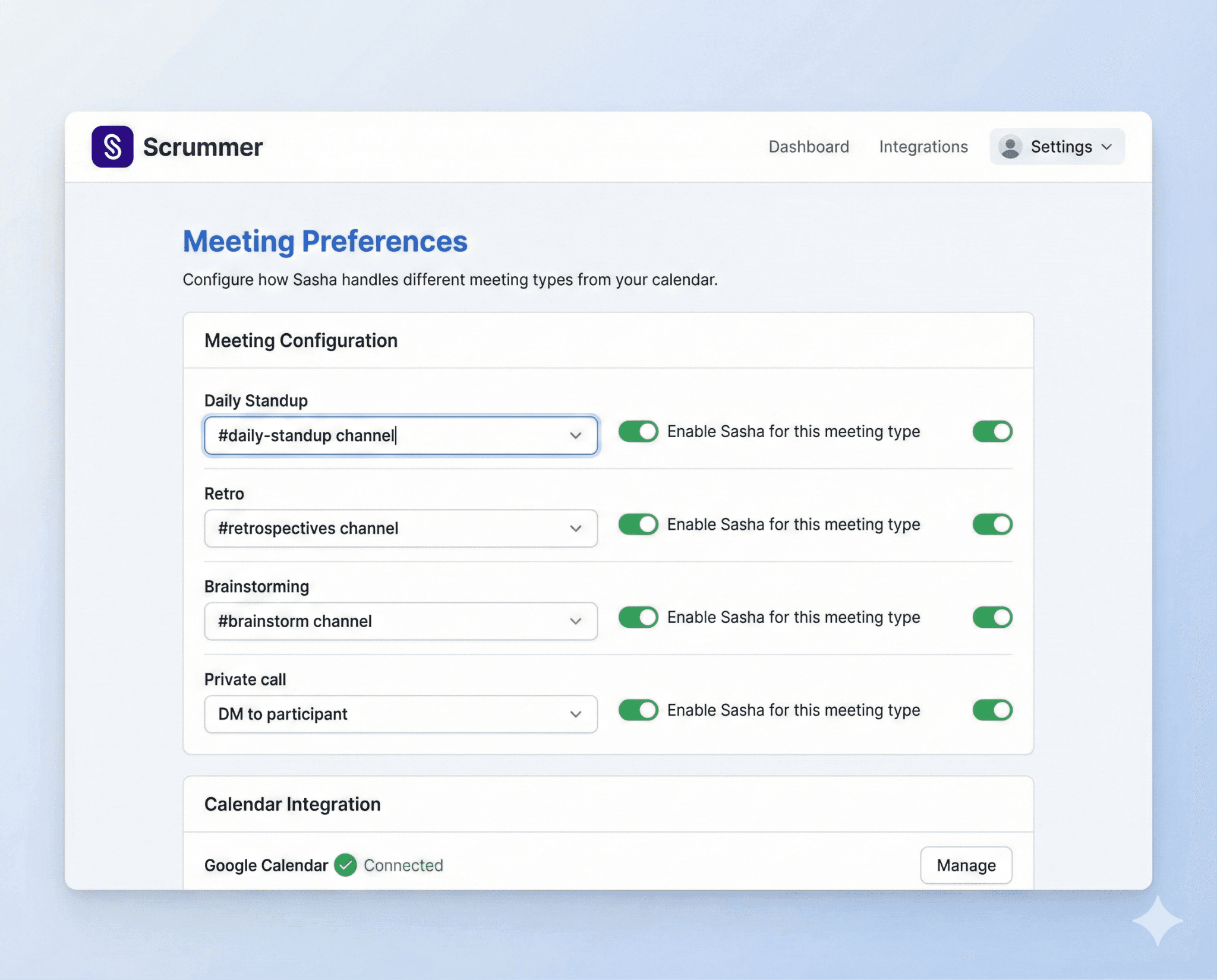
Configure meeting types so standup summaries go to standup channels, retros go to retrospectives, and private calls go to DMs.
- Automated standups — Collect updates without requiring everyone online at the same time - Blocker resolution — Automatically connect people who can help each other - Status digests — Weekly summaries of team health and sprint progress
Why this matters: The 30-minute daily standup is increasingly impractical for distributed teams across multiple timezones. Async conversation intelligence captures the same information without requiring everyone online simultaneously.
Scrummer AI's daily check-in feature prompts team members at their configured timezone, collects responses, and automatically creates threads between people with blockers and those who can help resolve them.
5. Searchable History and Team Memory
Engineering teams need institutional knowledge that survives:
- Team member turnover - Sprint-to-sprint context loss - "Why did we decide this?" questions weeks later
Your conversation intelligence should provide:
- Searchable archives of all decisions and discussions - Cross-conversation context — "Show me all discussions about the authentication redesign" - Decision tracking — "Who approved the database migration approach?" - Pattern analysis — "What blockers come up most frequently in our standups?"
This becomes your team's searchable memory that doesn't disappear when someone leaves or when Slack's history limit hits.
Real-World Implementation: A Week with Conversation Intelligence
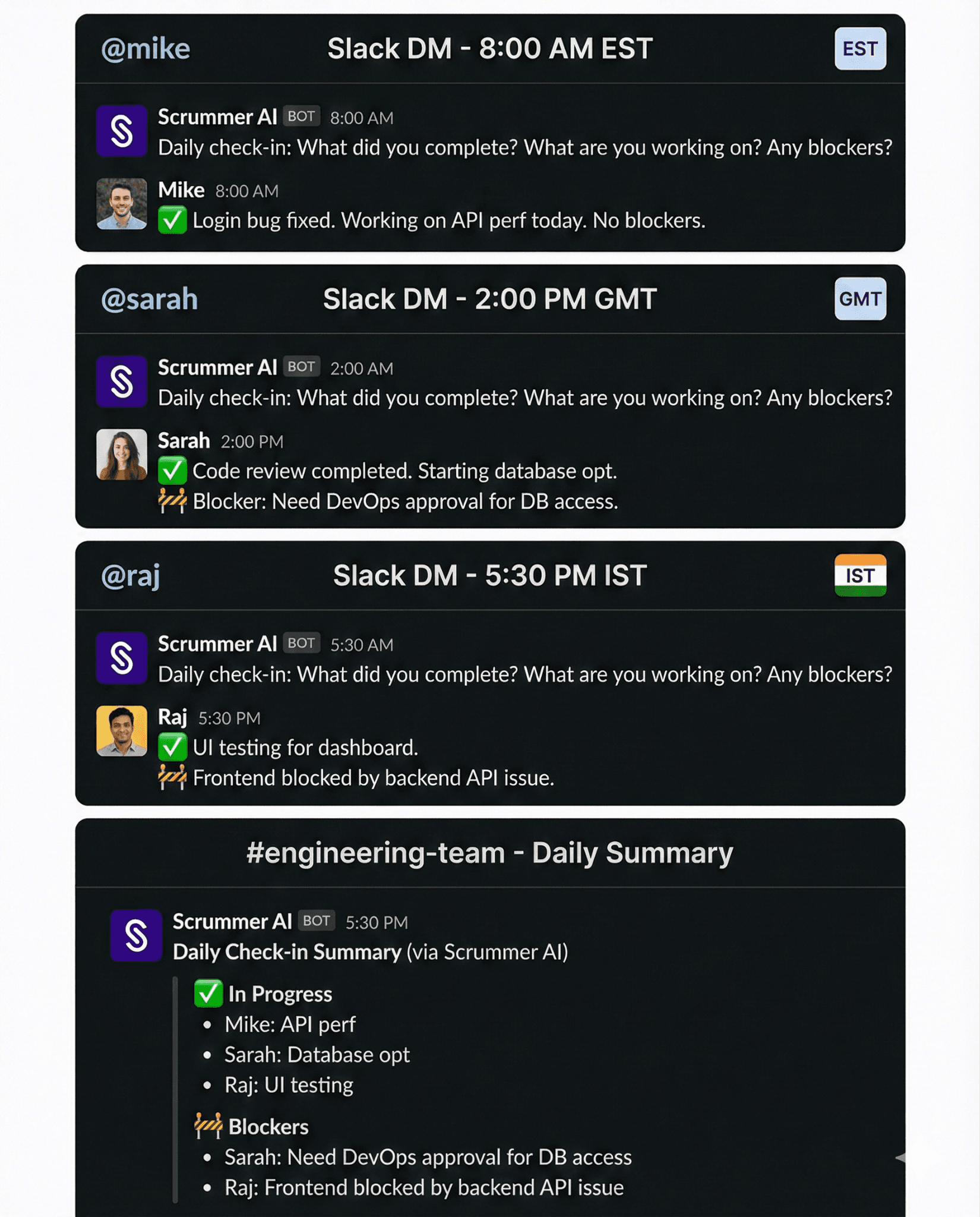
Scrummer's daily check-ins work asynchronously across timezones, automatically connecting blockers with people who can help.
Let's walk through a practical week to see how this works in real life.
Monday Morning: Async Standup
8:00 AM (East Coast) / 5:30 PM (India):
- Conversation intelligence (like Scrummer's AI agent Sasha) prompts each team member at their local time - Simple questions: "What did you complete? What are you working on? Any blockers?" - Responses get collected automatically - Posted as a digest to #engineering-team Slack channel - Blocker identified: "Can't merge my code—need database approval from DevOps"
8:15 AM:
- Conversation intelligence automatically creates a Slack thread between the blocked engineer and the DevOps lead - Both people get full context about the blocker - DevOps approves by 9:00 AM - Engineer unblocked without needing a synchronous meeting
Wednesday: Sprint Planning Meeting
2:00 PM: Planning meeting starts
- Conversation intelligence joins the Google Meet call (from calendar integration) - Before the meeting starts, it surfaces helpful context: "Last sprint completed 28 out of 30 story points" - During planning, team discusses upcoming work - Decisions captured: "Sarah takes the authentication redesign (estimated 8 points), Mike takes the API speed improvements (estimated 5 points)"
2:45 PM: Meeting ends
- Conversation intelligence generates a planning summary - Automatically creates Jira tickets for each story discussed - Assigns owners based on who volunteered - Posts summary to #sprint-planning Slack channel - Everyone has clarity without anyone taking manual notes
Friday: Sprint Retrospective
4:00 PM: Retro meeting
- Team discusses what went well, what didn't, and what to improve next sprint - Conversation intelligence captures everything in a retro-specific format
4:30 PM: Meeting ends
- Retro summary posts to #retrospectives channel - Process improvement action items become Jira tickets tagged as "process improvements" - Each improvement has an assigned owner - Historical retro data becomes searchable: "What deployment issues have we raised before?"
Weekly Digest: Sunday Evening
- Conversation intelligence pulls data from Jira - Generates a sprint health report - Emails to product managers and stakeholders - "Sprint 47: 85% complete, 3 blockers resolved this week, team velocity trending up" - Leadership gets visibility without requiring status meetings
Result: Less time in synchronous meetings. Better documentation. Faster blocker resolution. Clear accountability.
📊 PRODUCTIVITY IMPACT — Teams using conversation intelligence report: 25% increase in productivity (from Gong's case studies), 50% reduction in administrative tasks (from Jira-Slack integration studies), and 30% fewer synchronous meetings needed (async standups replace real-time meetings).
Sources: SuperAGI research, Salto.io
How Conversation Intelligence Fits Your Tech Stack
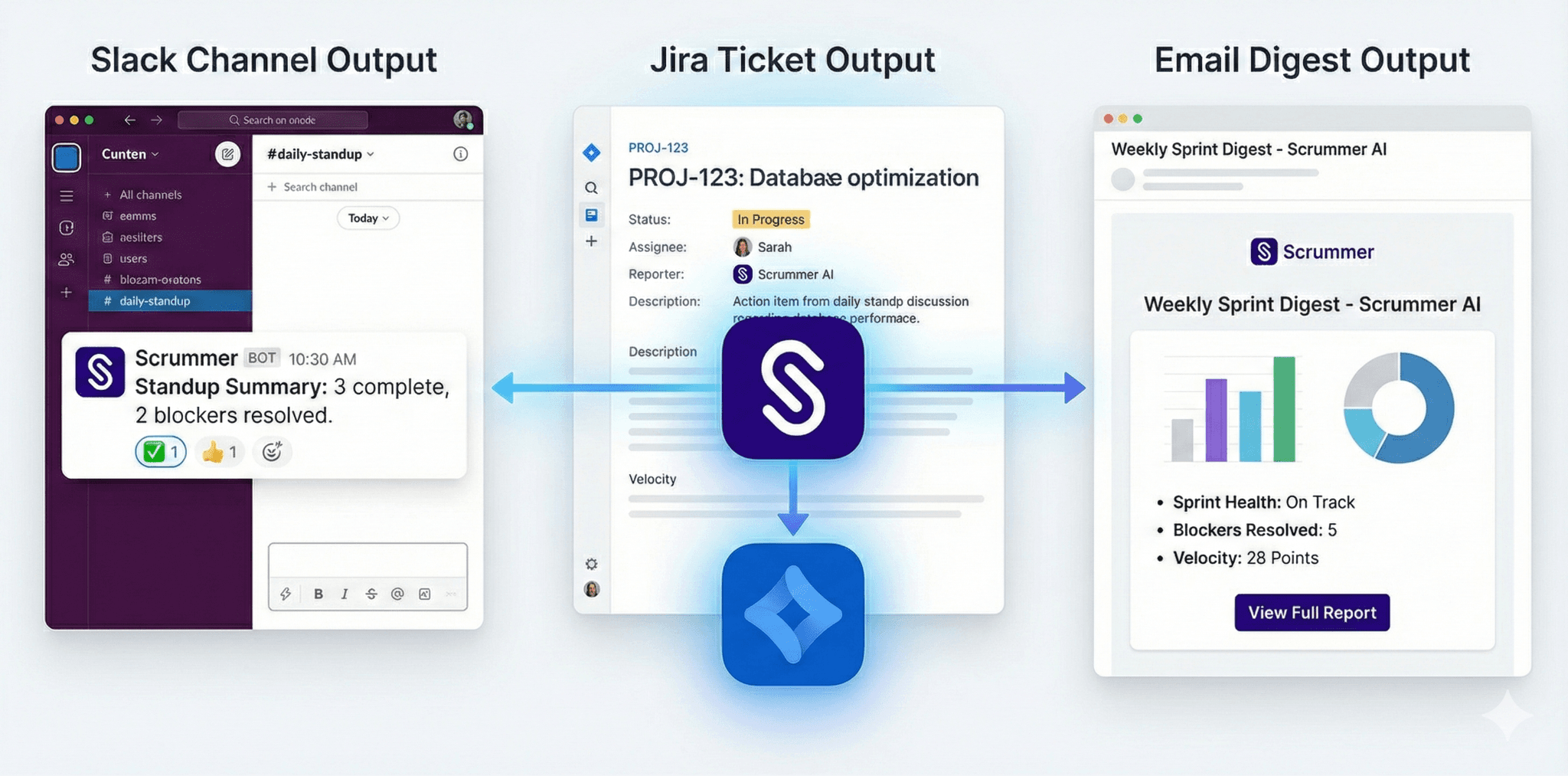
Scrummer delivers outputs where your team works: Slack channels for visibility, Jira for execution, email for leadership digests.
It's helpful to understand where conversation intelligence fits among your other tools.
|Tool Type|What It Does|What It Doesn't Do|Best For| |---|---|---|---| |Meeting Recording (Otter, Fireflies)|Records and transcribes meetings|Doesn't connect to work systems|General business meetings| |Project Management (Jira, Linear)|Tracks work tickets and progress|Doesn't capture conversations|All teams managing work| |Sales Intelligence (Gong, Chorus)|Analyzes revenue calls, updates CRM|Not built for engineering workflows|Sales and revenue teams| |Engineering Intelligence (Scrummer)|Captures discussions AND creates work in Jira|Doesn't focus on sales metrics|Engineering, product, agile teams|
The sweet spot: Engineering conversation intelligence sits between your communication layer (calendar, meetings, Slack/Teams) and your execution layer (Jira/Linear), automatically bridging the gap so conversations become action.
How Scrummer does this: It connects to your calendar to know which meetings to join, captures discussions from those meetings and your Slack or Teams channels, then outputs to both your chat platform (for visibility) and Jira (for execution).
How to Evaluate Solutions for Your Team
When evaluating conversation intelligence tools, use this framework:
Must-Have Features
1. Native Jira integration (not just generic connections like Zapier) - Creates tickets with full context - Two-way connection (reads and writes) - Supports your custom Jira fields
2. Calendar integration (the entry point) - Connects to Google Calendar or Outlook - Knows which meetings to join automatically - Respects your meeting preferences
3. Chat platform integration (Slack or Teams) - Captures channel conversations - Posts summaries to appropriate channels - Lets you ask questions conversationally
4. Understanding of agile workflows - Different outputs for standups vs retros vs planning - Meeting type configuration options - Supports both real-time and async workflows
5. Privacy and consent controls - Meeting-by-meeting opt-in (not automatic everywhere) - Clear indication when AI is listening - Admin controls at the workspace level
6. Searchable history - Find past decisions quickly - See context across multiple conversations - Track who decided what and when
Red Flags to Avoid
- Sales-focused tools trying to serve engineering teams (wrong feature set) - Bot-heavy tools that join every meeting uninvited - No native Jira integration (only generic webhooks that break) - Can't handle async or distributed team workflows - No understanding of different meeting types (treats standup like brainstorming) - Poor security certifications or unclear data handling
Questions to Ask Vendors
Ask these specific questions during demos:
1. "How do you connect to my calendar, and which calendar systems do you support?"
2. "Can you create Jira tickets directly from Slack or Teams conversations? Can I see an example?"
3. "Do you support async daily standups for teams across multiple timezones?"
4. "Can I configure different outputs for standups vs retrospectives vs planning meetings?"
5. "How do you handle sprint retrospectives differently from other meeting types?"
6. "Can I search across all conversations to find when we made a specific decision six weeks ago?"
7. "What's your approach to privacy—do you auto-join meetings or require explicit permission?"
8. "What security certifications do you have?" (Look for SOC 2, GDPR compliance)
The Future: Where This Category Is Heading
The category is evolving rapidly. Key trends to watch:
1. Proactive Intelligence (Not Just Reactive)
Today's tools are reactive—you ask a question, they answer. Tomorrow's tools will be proactive:
- "Your team has mentioned authentication issues in 3 different threads—should I create a Jira epic to track this?" - "Sprint velocity is trending down this week—here are the top 3 blockers mentioned in standups" - "You discussed this API design 6 sprints ago—here's what you decided and why"
2. Connecting Everything
As Software Engineering Intelligence matures, conversation intelligence will connect:
- Conversations + Git commits + Code reviews + Deployment data - Complete visibility from "we should fix this" → ticket created → code merged → deployed to production
3. Team Health Insights
Beyond execution, conversation intelligence will surface:
- Team sentiment trends over time - Collaboration patterns and potential silos - Early burnout signals from conversation tone - Knowledge distribution (who knows what on the team)
4. Self-Generating Documentation
The best documentation will auto-generate from conversations:
- Architecture decisions captured from Slack threads - Onboarding guides built from how senior engineers explain concepts - Runbooks generated automatically from incident post-mortems
Getting Started: A 4-Week Plan
If you're considering conversation intelligence for your engineering team, here's a practical rollout plan:
Week 1: Assess Your Current State
- Track how many Slack or Teams decisions actually make it to Jira - Measure time your team spends on manual standup summaries - Count meetings that could potentially be async - Identify your biggest "execution gaps"
Week 2: Define Your Requirements
- Which conversations need capturing? (meetings only, or chat platform too?) - What work systems do you use? (Jira, Linear, GitHub Projects) - What agile ceremonies does your team run? - How distributed is your team across timezones?
Week 3: Test with Real Workflows
- Try solutions with your actual team (not hypothetical scenarios) - Start with one team first, not company-wide - Measure time saved and accuracy - Check if the team actually uses the outputs (adoption matters!)
Week 4: Roll Out Gradually
- Start with just daily standup automation - Add sprint planning and retro capture - Expand to chat platform conversation capture - Measure adoption and iterate based on feedback
Tools like Scrummer AI are built for this gradual rollout approach. You can start with daily check-ins, add meeting intelligence for standups and retros, then expand to full Slack-to-Jira or Teams-to-Jira automation as your team gets comfortable with the tool.
Final Thoughts
Conversation intelligence for engineering teams isn't about recording meetings or analyzing sales calls. It's about closing the execution gap between discussions and action.
Your team already has great conversations. Decisions get made. Blockers get raised. Context gets shared.
The question is: Does that conversation turn into execution in Jira? Or does it disappear into your chat platform's black hole?
The right conversation intelligence ensures every decision, blocker, and action item makes it from talk to execution—automatically.
Ready to Close Your Team's Execution Gap?
Scrummer AI is purpose-built conversation intelligence for agile and engineering teams. Connect your meetings, Slack or Teams, and Jira to turn every conversation into clear execution.